
Structured Prompting in real projects - checklist & best practices#
Why you should care about structured prompting#
Working with LLMs is fun. At first you write a prompt, get a response, copy-paste, maybe tweak it by hand. But once you start building real systems (chatbots, pipelines, data extraction tools…), suddenly you’re dealing with a mix of inconsistent outputs, parsing failures, manual cleanup … and a creeping sense you might not hire yourself in six months if things grow.
Free-form prompting feels flexible, but in the long run it becomes breakable. Small changes to phrasing or context can lead to big shifts in output structure. That means fragile regex-parsers, subtle bugs, and unpredictable integration behavior. This ambiguity is exactly what structured prompting helps you avoid.
If you followed my earlier deep dive into TOON (JSON vs. TOON: A New Era of Structured Input), you already know how a more compact and semantically clean format can reduce ambiguity before the prompt even reaches the model. TOON is not just a clever encoding trick, it is an example of how structured input and structured output naturally complement each other. If you combine both ideas, you get a workflow that is more predictable, more token-efficient, and less fragile as your system grows.
For this post I am taking the next step in that direction and focusing on structured output, backed by strict schemas and automatically validated responses. You can also find the full sample project on GitHub.
Enter structured prompting: You treat your prompt as a data contract: you define exactly what the output should look like (fields, types, maybe even constraints), you ask the LLM to honour that contract, and then you parse/validate the output just like you would any other external data source. At this point, you can think of an simple API you are requesting for data.
If you build your LLM integrations right, with schema definitions, validation and a robust workflow, you get reliability, predictable output, and cleaner integration.
Practical benefits & where it pays off#
Structured prompting shines especially in these scenarios:
- Data extraction from unstructured text (emails, support tickets, logs, scraped HTML…) → output an object, not a story
- Automating pipelines: Let LLMs produce JSON (or another structured format), then feed that directly into databases, APIs or further processing → no manual “cleanup work” needed
- Generating content with a fixed template (e.g. product descriptions, metadata, summaries, configuration files) → you can constrain length, force required fields, enforce enums instead of free-text chaos
- Maintaining and versioning prompts over time. When prompts are structured, you can treat them more like code → diffable, testable, maintainable
In larger projects or production environments, structured prompting often isn’t “nice to have”, it becomes essential.
Checklist: Best Practices for Structured Prompting 🧰#
Here’s a practical checklist for you (or any developer) to follow when using structured prompts:
Define a clear schema#
Use JSON Schema, or your language’s equivalent (e.g. typed data models) to define exactly what output you expect - field names, data types, required vs. optional, enums or value constraints where appropriate.
Provide a template / example output in your prompt#
Instead of saying “please output JSON”, show a minimal example (empty or with placeholder values). This guides the LLM on structure, order, and expected types, and dramatically increases consistency.
Keep schemas as simple as possible initally#
Start with only a few required fields. Once basic outputs work reliably, you can extend the schema. This reduces initial complexity and debugging pain.
Validate every output programmatically#
Do not assume the LLM always follows the schema. Always parse and validate. If parsing fails, implement retry logic or fallback handling.
Make schema and prompt versioned & maintainable#
Treat prompt and schema like source code. Put them under version control. Keep them modular and documented. That way changes are traceable, and you avoid “works on my machine” secnarios.
Know when not to use structured prompting#
For creative, open-ended tasks (storytelling, marketing copy, brainstorming, image generation) a rigid schema may hamper quality and expressiveness. Use structured prompting when you want precision, consistency, and machine-readable outputs, otherwise free-form might still win.
Minimal .NET / pseudocode example - how it could look in a real project#
| |
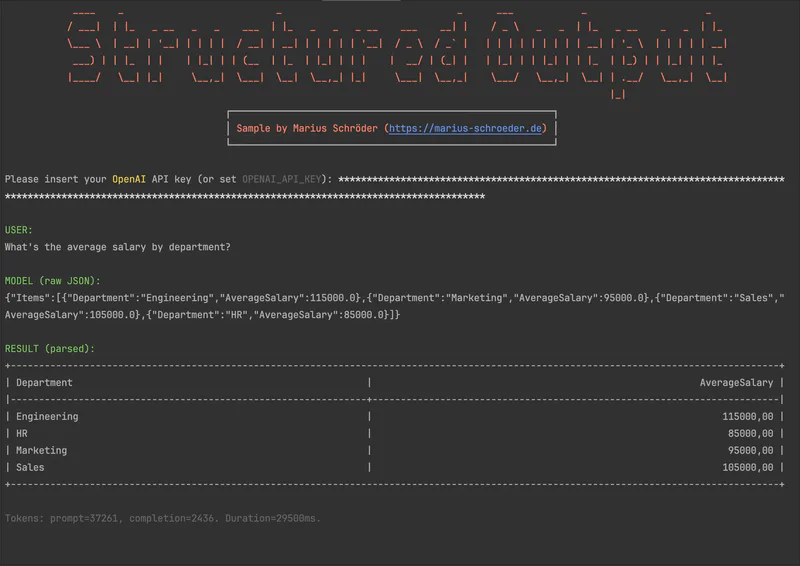
This is rudimentary, but it is precisely this approach that makes your LLM code maintainable, robust, and automatable.
What structured prompting does not solve - caveats & limitations#
A schema can guarantee structure, but not correctness. The model may still output garbage, structurally valid JSON with wrong data. Structured prompting helps with format, not with semantics oder qualitative kindness.
Complex or deeply nested schemas increase the risk of parsing failures or token limits. With very large outputs, the model may intentionally or unintentionally cut off parts.
When used in creative scenarios, structure can limit freedom, sometimes you just want free text, not rigid objects.
Final Thoughts#
For me, structured prompting is no longer a toy. It is a serious tool when working with LLMs, especially if you want more than just to “try it out quickly.”
If you expect outputs to be further processed, versioned, or automated, then the effort is immediately worthwhile. The small overhead of schema definition and validation quickly pays off, through fewer errors, more consistency, and more elegant integration into real software.
If you continue as before with JSON vs. TOON, for token efficiency, performance, and clean data formats, then structured prompting could be your next upgrade.