
Translation of custom angular packages#
If you want to translate material components like the material paginator you will not get around to extend some classes.
So for the paginator you need to extend a class called MatPaginatorIntl.
Because we want to use our custom translation service with its registry and loader, we normally would extend the TranslationBase. Due to restrictions of TypeScript, it is not possible to extend/inherit more than one class in a single class. So we now, want to generate an interface, which describes the requirements of our TranslationBase. This interface requires the implementation of an id and a method getTranslation which will return the translation object.
After that, we are ready to implement a class which extends the MatPaginatorIntl and implements the translation interface.
Normally the labels of the paginator are only brought once. So we have to extend this on every language or translation change. This can be achieved by subscribing the onLangChange and the onTranslationChange events, where we can just notify the changes-subject provided by the MatPaginatorIntl and reassign the label properties.
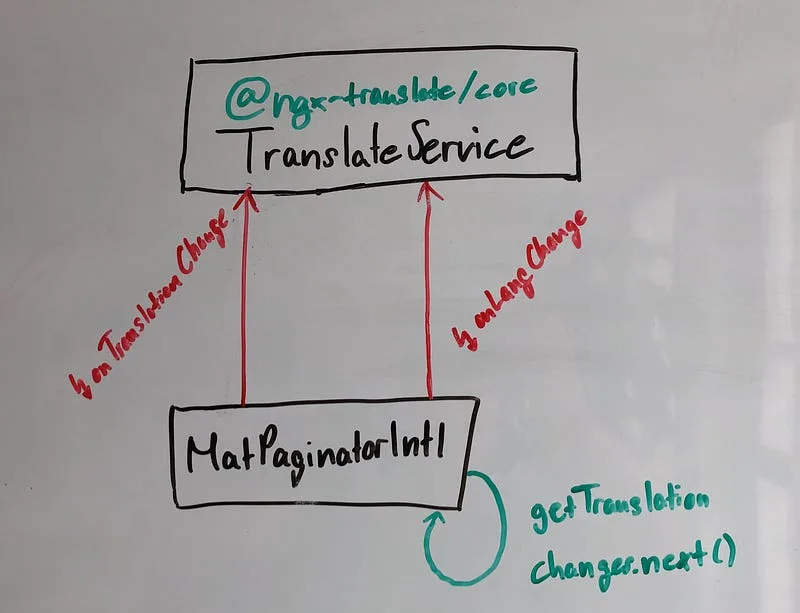
So our final code looks like the following:
TranslatedMatPaginator
Finally we want that our custom MatPaginatorIntl is getting used. All we have to do to achieve this, is to import the MatPaginatorModule and override the default provider.
TranslationModule provides MatPaginatorIntl
Conclusion#
In my opinion it’s kind of uncomfortable to extend those classes, but it’s pretty fast forward and easy to understand how to translate material components which ship their own translation and still preserve the advantages of the basic ngx-translate. Go multilingual!
Special thanks to Thomas Sebastian Jensen, which provided me with feedback.
Please feel free to provide feedback.