
Fixing the Default Callout’s Text Limitations with Your Own UI#
We ran into this while working on a real-world project. If you’re seeing text cut off in ArcGIS callouts, you’re not alone — and the fix is easier than you’d think.
😖 The Problem: ArcGIS Callouts Cut Off Text#
When using ArcGIS Runtime SDK in .NET (especially with .NET MAUI), you might notice a strange issue:
- Your graphic pins work fine.
- You try to display a longer label or address.
- The default Esri callout cuts off your text.
This becomes a real problem when dealing with:
- 🏢 Long company names
- 📍 Full addresses
- 🧾 Formatted data
It turns out: the Esri-provided callout just isn’t made for much content. There’s no scroll, no wrapping. Just truncation.
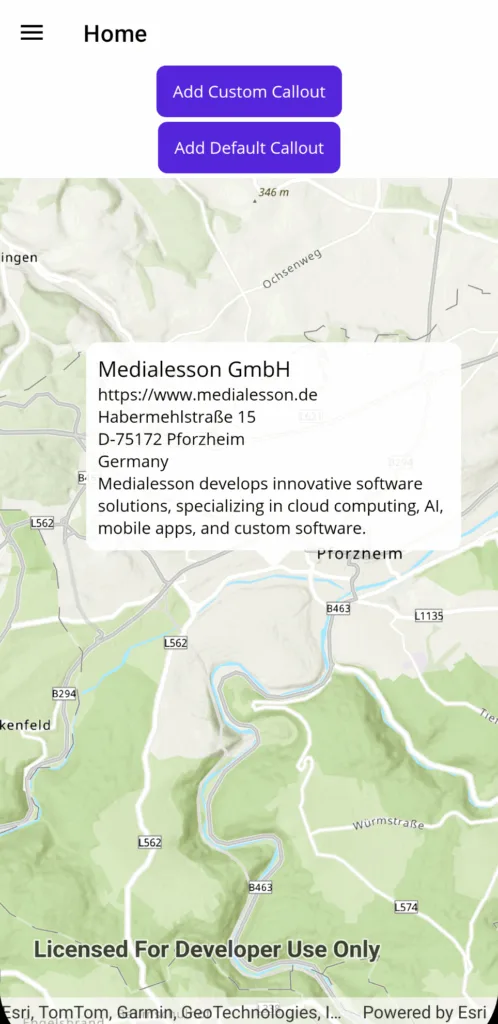
✅ The Simple Solution: Use a Custom Control#
After quite a bit of head-scratching and documentation-diving, we discovered the real solution:
You can just define your own control and use
ShowCalloutAt.
Here’s our custom callout XAML, used in a .NET MAUI project:
| |
And here’s how we show it on the map:
| |
That’s it. Your own control. Your own styling. Full control over layout and scaling.
🔥 Why This Is Better#
- ✅ Multiline text works
- ✅ You can customize the layout
- ✅ Great for long strings like addresses or formatted data
- ✅ No more truncation headaches
- ✅ Works across platforms (.NET MAUI, WPF, WinUI)
🚧 Why We’re Writing This#
We spent too much time trying to figure this out — and couldn’t find a good example in the official documentation. Most samples rely on CalloutDefinition, which isn’t suited for long or rich content.
We hope this post saves someone (maybe you!) some time and frustration.
📦 Want to Try It?#
👉 Check out the full sample on GitHub
And if you’ve also had trouble with the map zooming way out when your pins are aligned vertically or horizontally, you’ll want to read this too:
📘 Fixing ArcGIS Map Zoom Issues When Pins Share Coordinates
🔍 For searchability:#
If you’re searching for:
- “arcgis callout text cut off”
- “custom callout maui arcgis runtime”
- “showcalloutat custom control .NET”
- “arcgis runtime sdk long callout text not showing”
… then this is exactly what you’re looking for.