
At least for modern browsers 😉#
So you’ve got a Blazor WebAssembly app, and now you want to take it social! In this post, we’ll build a reusable ShareComponent that uses the Web Share API to let users share your app’s content with just one tap. And yes, this comes with some JavaScript magic.
1. Setting Up the Component#
First things first: let’s create a new Blazor component called ShareComponent in our Components folder under the BlazorWasm.Shared project. Since we’re using JavaScript here, let’s also have the framework generate a .razor.cs file (for code-behind) and a JavaScript file, scoped just to this component.
2. Adding a Share Button#
Let’s give users a friendly button to start sharing. Inside ShareComponent.razor, we add:
| |
3. Defining What We’re Sharing#
Now, in the code-behind file, we set up the parameters for what we want to share: Title, Text, and Url. These are the fields the Web Share API supports, so let’s go ahead and expose them as public parameters. Aditionally, we are also injecting an instance of IJSRuntime, which will be used later to call our JavaScript:
| |
4. Writing the JavaScript#
Here’s where the magic happens. Our JavaScript file (ShareComponent.razor.js) contains a class that takes our parameters and calls the Web Share API. This function makes it easy for Blazor to hand over the data, while we enjoy a coffee. Here’s what the JavaScript looks like:
| |
Hint: We catch the error of the promise here, because it will throw an error if the user cancels the share.
5. Using the JS Runtime with Module Injection#
Back in Blazor, we’re going to use JS Runtime with module injection to load our JavaScript only when needed. Lazy loading our module keeps the app lightweight and ensures that everything loads smoothly. Here’s the full code-behind setup, where we also implement IAsyncDisposable to clean up any leftover references:
| |
6. Using Our New ShareComponent in the Client Project#
Now for the fun part! We’re ready to use ShareComponent in our main project. For simplicity, let’s add it directly to Home.razor:
| |
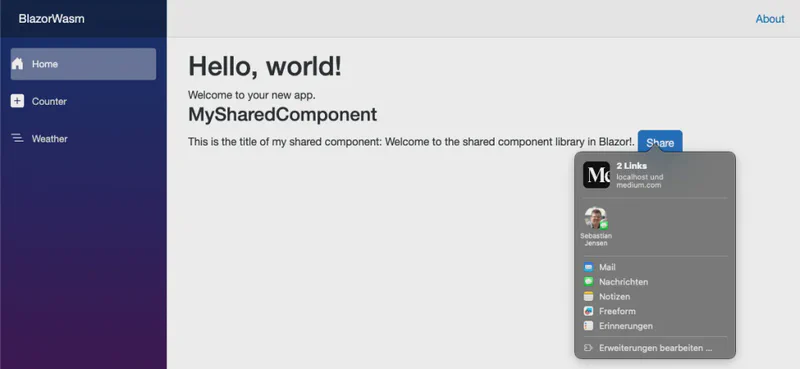
And there you have it! We now have a ShareComponent that allows users to share content directly from your Blazor WebAssembly app with the Web Share API.
Get the Code#
Ready to dive in? Check out the full example code for this Blazor WebAssembly project on GitHub: medium-blazor-wasm.
Feel free to explore, experiment, and contribute!
What’s Next?#
In the next blog post, we’ll build on the best practices for JavaScript integration we covered here, showing more about lazy-loaded JavaScript modules to keep things snappy. We’ll also dive into Lottie animations and integrating Tailwind CSS in your shared component library.
Thanks to WhatPWAcanDo.today for guiding us on what’s possible with the Web Share API — worth checking out!