
Turning Bricks into a Living, Breathing City#
Ever dreamt of a Brick (or Klemmbaustein, for the purists) city that not only looks cool but actually comes to life with synchronized lights, motors, and even stories? Meet Brick City — our tech-fueled, AI-powered digital Brick metropolis.
This blog will take you behind the scenes to show how we transformed Brick City into an interactive experience using ASP.NET Core, Blazor WASM, and some clever AI integration. Spoiler: It’s not just about lights.
The Plan: Make It Shine#
Our goal: create a city that tells stories while shining, blinking, and moving like a high-tech wonderland.
Here’s the checklist:
- Light it up with Light My Bricks kits.
- Move it using motors for dynamic scenes.
- Tell a story where the lights and motors synchronize with a narrative.
- Add interactivity to have users explore and control the city in real time.
Simple, right? Well…
The Brains of Brick City#
We built the backend with ASP.NET Core, the frontend with Blazor WASM, and connected them with a SignalR service for real-time communication. But here’s where things get really interesting: AI.
The AI in Brick City doesn’t just control lights and motors; it answers questions, provides stories, and — get this — knows the lunch menu at Ochsenpost, our favorite restaurant in Tiefenbronn. More on that later.
The Cool Part: Real-Time AI Chat#
To make the city interactive, we hooked up a real-time chat AI to take commands from users, generate stories, and trigger light and motor sequences. The plan was ambitious, but hey, this is Brick City!
The (First) Problem: AI Got Overwhelmed#
Everything was great until we asked the AI to calculate complex timing sequences for the lights and motors. The result?
- The calculations were too slow.
- The AI would respond with something like, “That’s a great question, but let me get back to you in, oh, 30 seconds or so.”
- Meanwhile, the city was dark, lifeless, and… awkward.
The Solution: Divide and Conquer#
Instead of relying on one AI model to do everything (because, let’s face it, even AI has limits), we split responsibilities across multiple GPT-4o models.
- Story Generation AI:
This model crafts the next chapter of the city’s tale. Think of it as our in-house novelist who loves plot twists and cliffhangers. - Sequence Calculation AI:
This one handles the nitty-gritty — when to turn the lights on, how long to leave them running, and when to make the motors move. It’s like the stage manager who knows when to cue the spotlight. - Real-Time Chat AI:
Now freed from heavy lifting, it acts as the city’s narrator, interacting with users and sending them the story while the other AIs handle the back-end chaos.
Beyond Stories: Brick City’s Chat Features#
The real-time chat AI isn’t just a storyteller; it’s also the city’s concierge. Ask it about:
- Building information: Curious about the Brick Bank? Ask the AI to explain its significance, and it might even make the building blink to show it off.
- Lunch menu at Ochsenpost: Yes, really. Our AI has an in with our favorite Tiefenbronn restaurant. Want to know what’s for lunch? Just ask.
If you’re curious how this magic works, check out my colleague Sebastian’s blog post about external API integrations.
How the Magic Happens#
Here’s the play-by-play of Brick City in action:
User Interaction:
- A user asks the AI, “Tell me a story!” or “What’s the lunch special at Ochsenpost?”
Internal Tool Calls:
- The real-time chat AI calls the story AI for a narrative or queries external APIs for lunch menus.
- The calculation AI determines the precise light and motor sequences based on the story.
Synchronization:
- The story is sent back to the chat AI, which narrates it in real time.
- Simultaneously, the lights and motors bring the story to life.
Why Splitting AI Rocks#
Splitting responsibilities wasn’t just about speed (though that’s a huge win). It also gave us:
- Better Specialization: Each AI focuses on what it’s best at — no multitasking disasters.
- Scalability: Need a better story? Upgrade the story AI. Timing off? Fine-tune the calculation AI. No need to overhaul everything.
- User Delight: Faster, smarter responses make the experience seamless and magical.
The Result: A City That Dazzles#
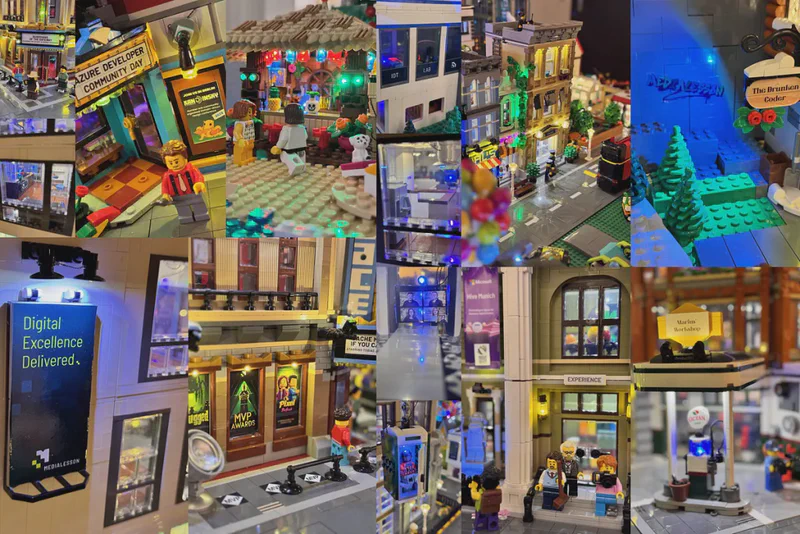
Brick City is now more than a Brick display — it’s an interactive world. Imagine this:
- As the story says, “Night falls over Brick City,” the lights dim gradually, casting a twilight glow.
- When the narrative adds, “A train barrels down the tracks,” motors hum into action, making the scene come alive.
And if you ever wonder what’s for lunch, the AI can casually let you know that Ochsenpost is serving schnitzel today.
What’s Next for Brick City?#
The possibilities are endless:
- Personalized Stories: Let users write their own adventures, with AI filling in the gaps.
- Dynamic Events: Tie lights and motors to weather conditions or user votes.
- Bigger, Brighter City: More bricks, more lights, more magic!
Brick City taught us one thing: With the right tools (and a little help from AI), even a city of tiny plastic bricks can be a vibrant, interactive masterpiece.
So, what’s your Brick City dream? Tell us in the comments, or better yet — build it yourself.