
Dependencies vs. DevDependencies vs. PeerDependencies vs. BundledDependencies vs. OptionalDependencies#
If you are new to Angular or custom component creation on Angular, you will come to a point where you have to decide between which level of dependency your custom component needs.
In Angular we have several options to declare dependencies for our components, which is done in the “package.json” (same file, where you declare the version number).
dependencies:#
Dependencies which are declared as “normal” dependency in your component, are getting installed with the npm install call.
This is recommended when this dependency is absolutely necessary by your component or if you do not want the user to decide, if he wants to install the needed dependency.
devDependencies:#
DevDependencies are exclusively needed for development only (for example testing packages). They will be automatically installed with the npm install call, unless you pass the
–production
flag.
Those packages are not installed transitively, which means that they don’t install other packages which are not necessarily needed.
You can use those dependencies for packages like linting-tools (static code analysis) or something else.
peerDependencies:#
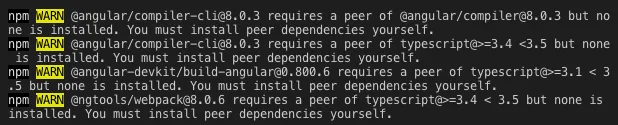
PeerDependencies are not installed transitively. If you declare a dependency as a peer dependency, this dependency will generate a warning if it is missing on the project. If you are running your app without this dependency (and it is really necessary for another dependency) you will get an error.
Otherwise, if it is a dependency which is actually not really necessary, it does not need to get installed. For example:
You have a custom component which uses a npm package for the icons to show. If this package is missing, the component could still work without the icons.
bundledDependencies:#
Basically the same functionality like normal dependencies, but the declared bundled dependencies will be packed and shipped with your component.
Good for ensuring the right version of a package or installing packages, which are not available in the npm registry.
optionalDependencies:#
OptionalDependencies are more likely peer dependencies. npm will try to install those dependencies, but if the package is not found or fail to install, it will proceed with installing.
Example#
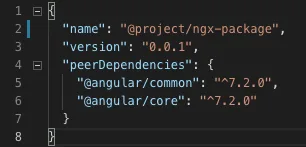
The following example shows the initial “package.json” of a library project. “@angular/common” and “@angular/core” are declared as peerDependencies because they should be normally already installed in every angular project which include the new library.
Versioning#
For npm there are many opportunities to manage the accepted version of packages. Most common version identifiers are the caret (^), the tilde (~) or a constant version.
Versions are described by the **v2.0.0** specification found at http://semver.org/.
The caret (^)#
The caret operator allows to specify values depending on their leftmost non-zero number. It allows everything except major updates.
^1.2.3 → Everything up to Version 2.0.0 (exclusive)^0.0.3 → Everything up to Version 0.0.4 (exclusive)
The tilde (~)#
The tilde operator allows to specify minor level changes on patch level and is depending on the given version:
1 → Between Version 1.0.0 and 2.0.0 (exclusive). It can also be written as 1.x1.2.3 → Between Version 1.2.3 and 1.3.0 (exclusive)
Addition:#
It is also possible to append tags like “alpha”, “beta”, “rc” and it will be appended at the end of the version:
v1.2.3-betav1.2.3-beta.2
The order is:
1.0.0-alpha < 1.0.0-alpha.1 < 1.0.0-alpha.beta < 1.0.0-beta < 1.0.0-beta.2 < 1.0.0-beta.11 < 1.0.0-rc.1 < 1.0.0. (see https://semver.org/).
For more informations, I can highly recommend to take a look at https://docs.npmjs.com/misc/semver.
Conclusion#
I recommend to use dependencies, devDependencies and peerDependencies. I am using dependencies for packages which are necessarily required by my application/component. DevDependencies are declared for things like the angular-cli. For things which should be available in the main project, which later includes my component, like @angular/common or @angular/core I am using peerDependencies.
Special thanks to Thomas Sebastian Jensen, which provided me with feedback for my first medium article.
Please feel free to provide feedback.